
Billing
View your subscription and open the Stripe billing portal.
The Billing & Subscription page shows your organisation's plan and lets you manage payment details.
Who can use it: Owner only. To open it, choose Admin Portal in the avatar menu, then Settings → Billing & Subscription.
Other roles who open the page see Access Restricted: "Only organization owners can manage billing and subscriptions."
What the page shows
- No Active Subscription: if the organisation has no plan yet, you see this message and a Choose a Plan button.
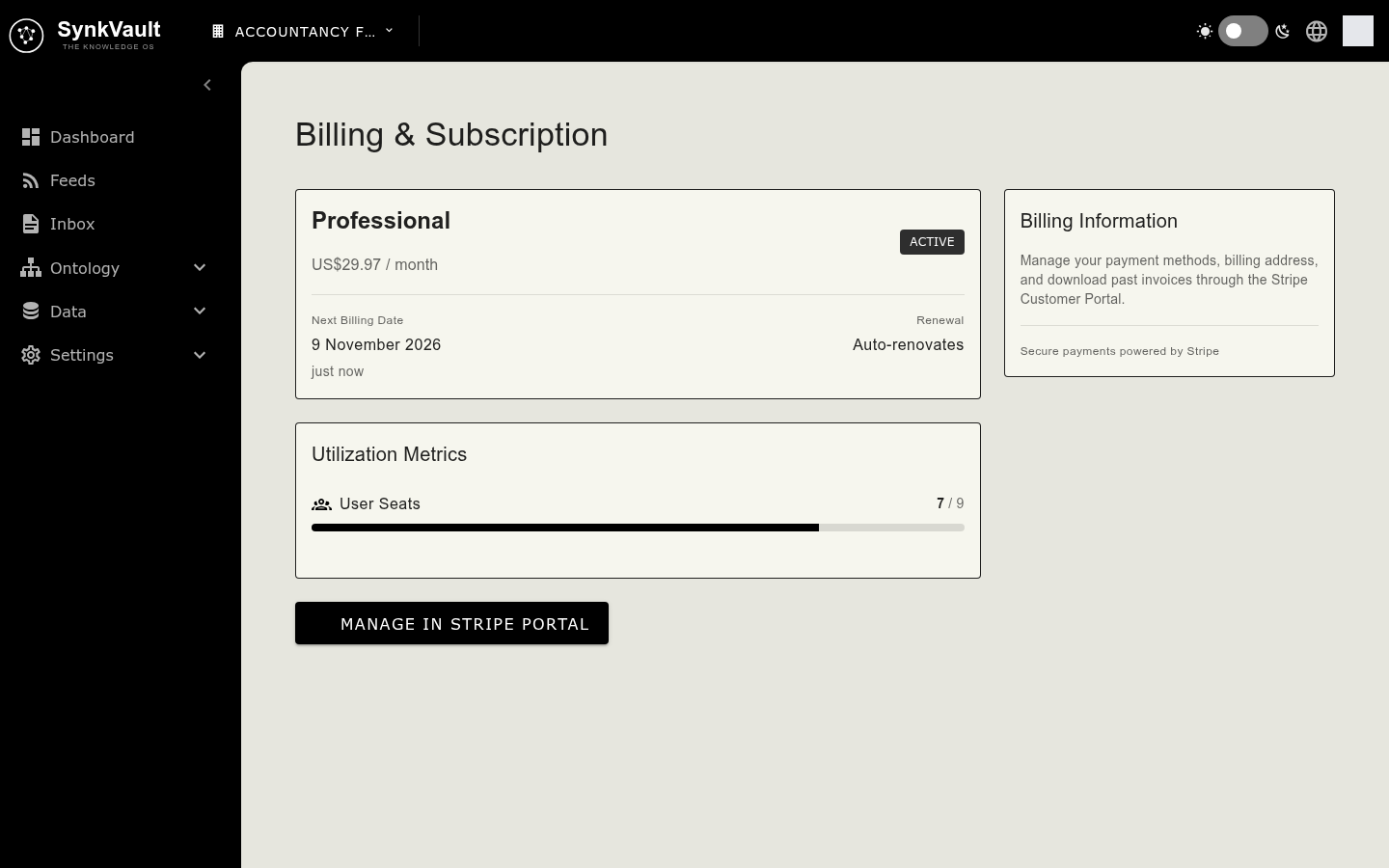
- Plan card: the plan name, its monthly price, a status badge, the next billing date and whether the plan renews. If the plan is set to end, a banner shows the end date.
- Utilization Metrics: User Seats used out of the total, and Storage Usage.
- Billing Information: a note that payment methods, billing address and past invoices are managed in the Stripe Customer Portal.
Manage payment details and invoices
- Select Manage in Stripe Portal.
- SynkVault opens the Stripe Customer Portal. Update your payment method or billing address, or download invoices there.
- When you return, SynkVault updates the page with any changes.
Adding seats or storage from Utilization Metrics also takes you to the Stripe portal.