Dashboard
See how much your organisation has ingested and how it is being used.
The Admin Dashboard gives owners and administrators a quick view of the organisation's knowledge base.
Who can use it: Owner and Admin.
Open the dashboard
- Open the avatar menu in the top bar.
- Choose Admin Portal.
- Select Dashboard in the left menu.
What you see
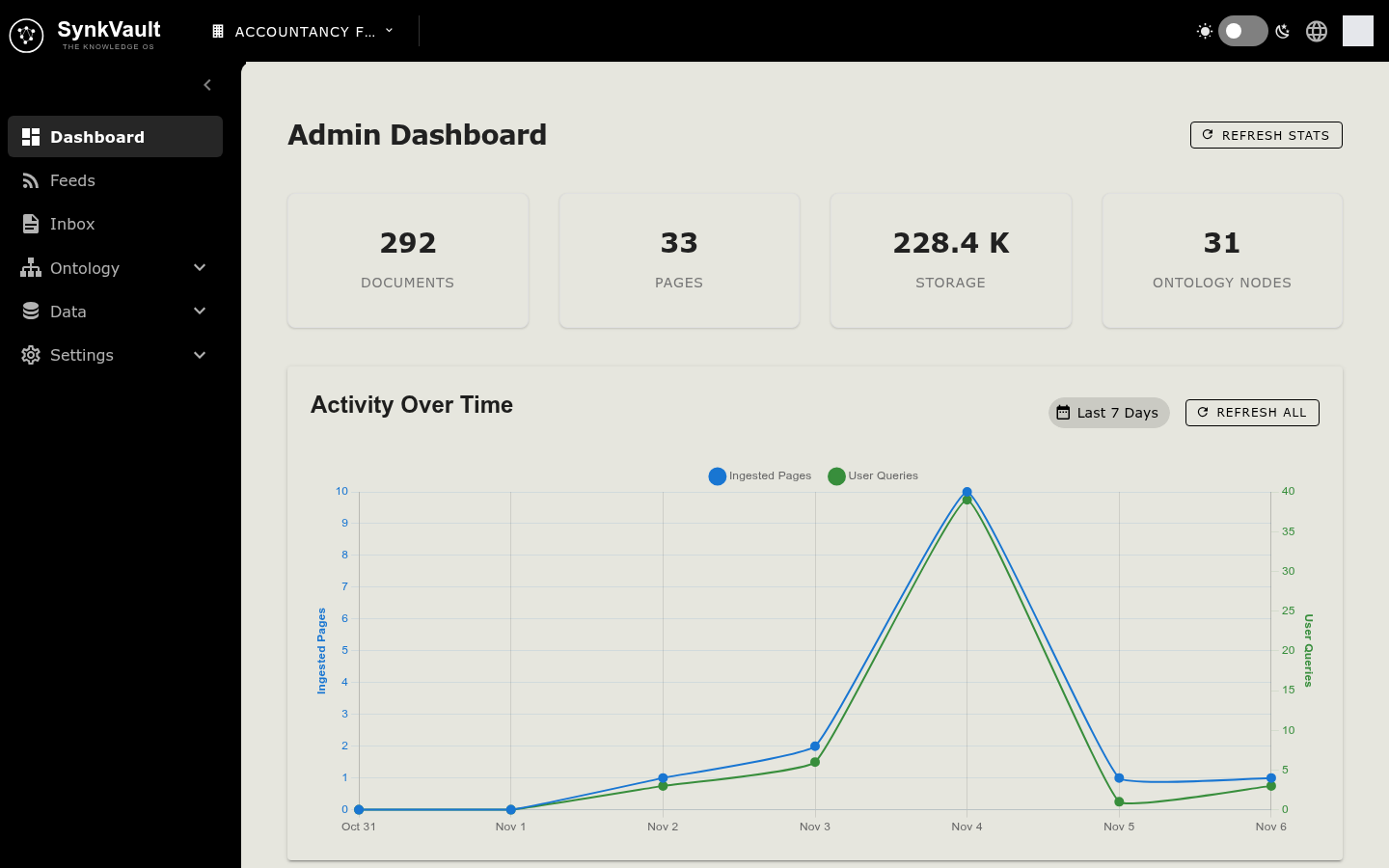
At the top, four cards show totals for your organisation:
| Card | Meaning |
|---|---|
| Documents | Number of documents in the organisation |
| Pages | Number of pages across those documents |
| Storage | Space used by your documents |
| Ontology Nodes | Number of nodes in your ontology |
Below the cards are three charts:
- Activity Over Time shows Ingested Pages and User Queries for the Last 7 Days.
- Document Classes Analysis shows a Top 10 Classes Distribution chart and a Classes Over Time chart.
If there is nothing to show yet, a chart displays a message such as No analytics data available or No classes data available.
Refresh the numbers
- Select Refresh Stats to reload the four cards.
- Select Refresh All in the Activity Over Time section to reload the cards and the activity chart.
- Select Refresh in the Document Classes Analysis section to reload the class charts.
The dashboard is read-only. You cannot change any data from this page.